
Everything your document library needs. Built into WordPress.
Help people find the right file, control who can access it, and keep your documents up to date — from public downloads to private client libraries.
Start free with unlimited documents. Add private access, workflows, and governance when you need them.
- FreeBuild and publish a searchable public library.
- ProAdd private access, search inside files, and document workflows.
- AI & GovernanceAdd records governance and optional AI-powered discovery.
Pro includes Free. AI & Governance includes Pro.
Free
A complete public library. Not a limited trial.
Publish unlimited documents in a layout that suits your content, with search, filters, and familiar WordPress editing.
- Choose your layoutSwitch between table, grid, gallery, and folders.
- Make documents easy to browseSearch titles, categories, and tags. Filter and sort without reloading the page.
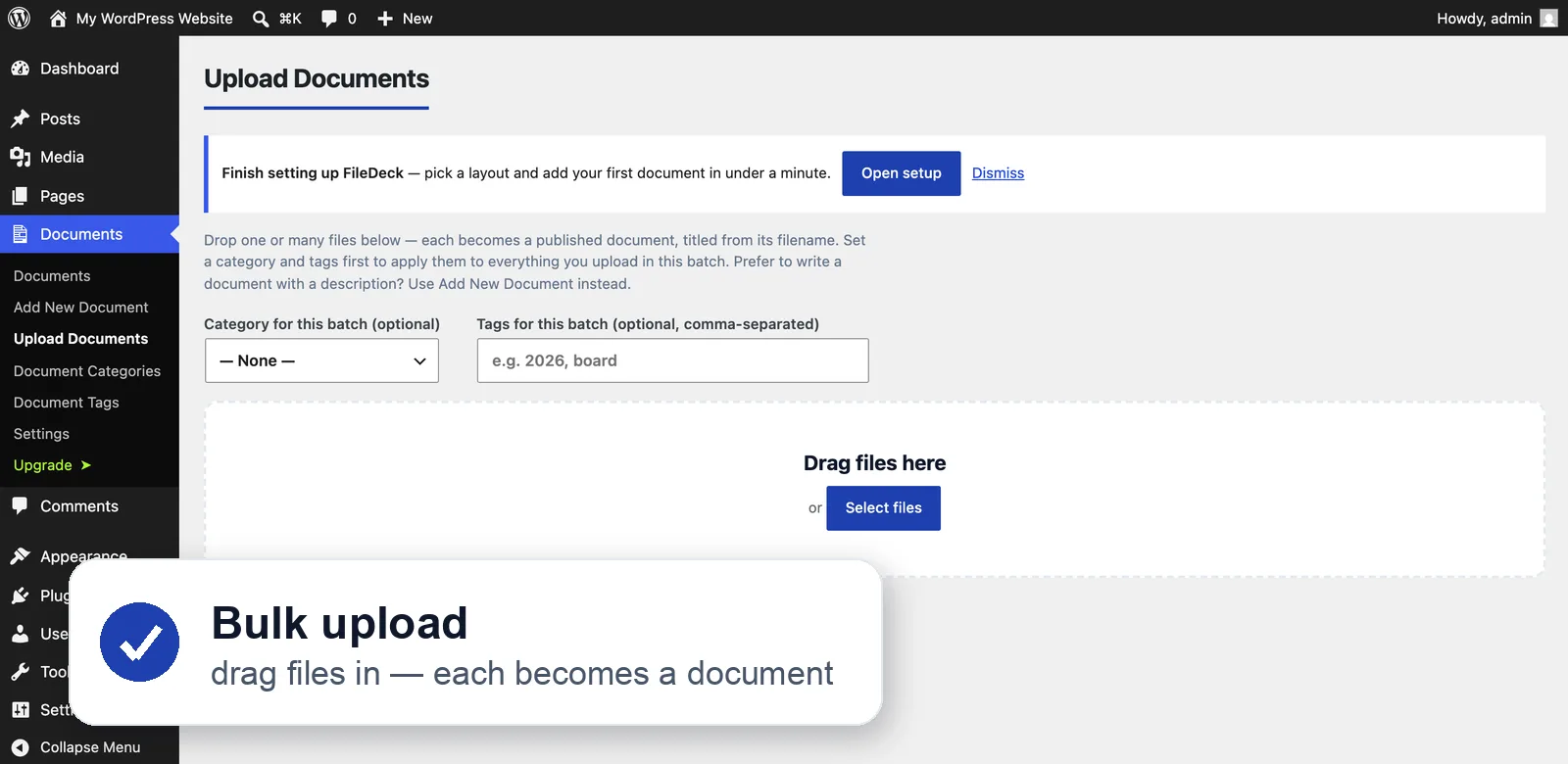
- Add documents in batchesDrag in multiple files and apply categories and tags together.
- Design it on your own siteThe library builder previews each change in your theme, then creates the page. Or use the block, shortcode, or page-builder elements.
More Free features
Four layouts
Table, grid, gallery or collapsible folders that follow your category hierarchy, sub-folders and all, with each folder counting everything beneath it — switch per library. The Gallery layout puts large thumbnails first for covers, plans and artwork; in free, a tile shows the featured image you set, and automatic thumbnails taken from the file itself — a PDF’s first page, an image’s own preview — are Pro. Choose columns (title, type, size, date, categories and more), set sort order and pagination.
Filter by date added, or by year
An Any time / Past week / month / year control, so a long library narrows to what arrived recently; and a year filter that lists the years your documents span, read from their dates — minutes, newsletters and accounts filed by year, with no category per year to maintain. Both off until you switch them on, per library if you want. Pre-filter without a control too: period="30" for a “recent additions” block, year="2025" for one year’s minutes.
A section per category
One library rendered as titled sections, one per category, each with its count — the downloads page most sites build by stacking a library per category, from a single group_by="category". One search box and one set of filters across all of them; a section with nothing left hides.
Reference numbers
A part number, document code or form number on every document. Visitors can search for it — 0208 finds DOC-0208 — and it shows as its own sortable column, so titles stop carrying the code.
AI agents can search it
FileDeck describes itself to WordPress 6.9’s Abilities API, so agents like Claude, Cursor or ChatGPT can search your library through the MCP Adapter. Read-only by design, and access-filtered: a restricted document does not appear — not even its title — and agents get a page link rather than a download URL.
Instant search & multi-select filters
Results filter as you type across titles, categories and tags — no page reloads. Pick several categories or tags at once, see the filter counts beside every option before you commit to one, and drop any single one of them from the list of active filters above the library. Put the filters in the bar above, or under the column headings.
Sort by more than one column
Click a heading to sort; shift-click a second to break the ties — file type, then newest first. The address bar follows the search, filters, sort and page you are on, so the view you are looking at is the view you can copy and send. Choose page numbers, a Load more button or infinite scroll, and give a library a fixed height if you would rather it scrolled in place.
Block, shortcode + page builders
Drop the Document Library block on any page, use the [filedeck] shortcode, or native Elementor widgets — Library, Document Embed (find it as “PDF Viewer” too) and Search — with Document Library and Document Embed elements for Bricks, Divi, WPBakery, Avada (Fusion Builder) and Beaver Builder as well. On Classic Editor, the Document library button builds the shortcode for you. Scope a library to a category or tag anywhere — and a translation plugin (WPML, Polylang) picks up documents, categories and tags via the bundled wpml-config.
Library builder
Design a library by clicking, not by typing shortcode attributes: layout, columns, categories, sorting, filters, download links, colours and messages. Each change redraws a preview on your own site, in your theme, as a logged-out visitor sees it. When it looks right, create the page in one click or copy the [filedeck] shortcode into any page builder. The Document Library block opens the same builder.
Unlimited documents
No caps on documents, categories or tags. Ever.
Drag-and-drop bulk add
Drop one file or fifty onto the Upload Documents screen — each becomes a published document, titled from its filename. Set a category and tags first and they apply to the whole batch. (Picking files you already have in the Media Library, and CSV import, are Pro.)
⌘K quick search
A site-wide command palette jumps visitors straight to any document.
Sidebar widgets
Recent Documents and Top Downloads widgets for any sidebar or block area, plus a Popular Documents block for any page — all access-aware, so a restricted document never shows to someone who cannot open it.
QR codes per document
Every document gets a QR code — print it on a poster or handout and it always resolves to the current file.
Download tracking
A per-document download counter, out of the box.
Force download or open in browser
Decide per document whether the button saves the file or displays it in a tab — instead of leaving it to each visitor’s browser.
Inline document embed
Embed a single document as an always-visible viewer inside any page — PDFs, images, and pasted Google Docs, Sheets, Slides or Drive links — via shortcode, block or Elementor widget. Set width and height, add a download link and a full-screen button, and choose the viewer engine. Pro extends it to Office files, audio and video.
Document pages
Every document has a page of its own: its description, a short list of details, then the Download button. Choose the details on the Display tab — reference, published and updated dates, categories and tags, plus author and download count if you want them. A detail a document doesn’t have is left out rather than shown blank.
Styles that match your theme
Pick “Match my theme” and the library inherits your theme’s colours, or set an accent colour and be done. Minimal, Bordered and Compact presets, a light / dark / auto colour scheme, surface and text colours, link styles, your own download-button wording, and your own “no documents” and “no search results” messages — no CSS required. Every element is also a --fdk-* variable when you do want to go further.
Files you host elsewhere
A document can point at a URL instead of an uploaded file — Google Drive, Dropbox, OneDrive, SharePoint, S3 or any link at all. It sits in the library, sorts and filters like every other document, and nothing is copied onto your server. (Pro adds a cloud connector that browses the account for you and pulls new files on a schedule.)
Old links keep working
Moved a library over from Download Monitor, WordPress Download Manager, Simple Download Monitor, Shared Files or Simple File List? Once the old plugin is switched off, its download links, item and category pages and shortcodes open your FileDeck documents, so posts, menus and old emails keep working. BSK PDF Manager’s shortcodes do too. The one-click import is Pro; this part is free, so it carries on if a licence lapses.
Fast & accessible
No jQuery on the front end, keyboard-navigable tables with ARIA labelling, and it works with any theme.
Theme template overrides
When CSS is not enough and you need different markup, copy a template into your theme’s filedeck/ directory — child theme first, then parent, then the plugin’s own copy. The row and the empty state are overridable today, and the files you copy are the ones FileDeck actually renders. Access rules are applied before a row reaches a template, so a customised row is not a place a restriction can go missing.
Pro
Find the answer inside the file.
Search beyond document titles. Help visitors find relevant content inside PDFs and Office files, then narrow the results with filters that match your library.
- Full-text search inside supported files
- Custom fields and faceted filters
- Search synonyms and spelling fallback
- Optional OCR for scanned documents
Search formats and requirements
Assign a document to specific people
Pick the people who can see a document and nobody else gets it — it does not appear in anyone else’s library at all, not even as a locked row, so one client never learns what another client has. Give a whole folder to a client and they can take it in one go with Download all. Changing access across a whole import is a bulk action, not a thousand edits.
Full-text search
Search the text inside PDFs, Word, Excel, PowerPoint, OpenDocument and text files — extracted on your own server. Jump to the page a match is on, straight from the result.
Scanned-PDF OCR (opt-in)
Send scanned pages with no text layer to the OCR service to make them searchable. It’s the only feature that sends file contents to a FileDeck-run service, and only when you turn it on — files are processed and discarded. What leaves your server
Previews & zip
Extends the free PDF & image lightbox to Office, audio and video, and adds multi-select “download as one zip”. Select all in the table header ticks every document at once — or, in the folders layout, just that folder.
Automatic PDF thumbnails
Grid and image views show a real first-page preview of each PDF, rendered on your own server. Rendering needs Imagick with Ghostscript, which most hosts provide; FileDeck checks yours, tells you if it can’t, and falls back to the file-type badge rather than a broken tile.
Custom fields
Add your own fields — department, policy number, publication date, owner — then show them as sortable columns. Optional per category, and importable from ACF.
Faceted filters
Let visitors narrow the library by any field, with live counts next to each value and min/max ranges for dates and numbers. Shareable via the URL, and fast on large libraries.
File-type & folder icons
Download buttons show file-type icons for PDF, Word, Excel and more, and each category can display its own folder icons in the folder layout — from a built-in set, no uploads.
Favourites
Signed-in readers star the documents they want to come back to, and read them off one page with
Office, audio & video embeds
Extends the free inline embed beyond PDFs and images: Word, Excel and PowerPoint files render through the Microsoft or Google viewer, audio and video play inline — access rules respected, and protected files never touch an external viewer service.
Self-hosted PDF viewer
The FileDeck viewer renders embedded PDFs from your own server — zoom, in-document find, print and full screen — with no external viewer service, so protected files, signed links and watermarked documents display where Microsoft’s and Google’s viewers can’t. Popup mode opens any embed in an overlay that loads only when clicked.
Attach documents to a post
Tick documents in the post editor and they list automatically at the end of the page — no shortcode to remember, and access rules still apply.
Pro
The right documents. For the right people.
Create private libraries and client areas, with access rules that control both document visibility and file delivery.
- Access by role, named person, group, or client area
- Protected file storage
- Signed sharing links
- Client uploads with moderation
More access and delivery controls
Access control
Password or role restriction per category, a password on any single document, and per-document visibility — public, logged-in, author only, or assigned to specific named people.
Client portal
Add a client and FileDeck creates their account, a private area and an emailed invitation to choose their own password. Clients sign in on your site, not the WordPress dashboard, and see only their documents, what is new since their last visit, an upload form and their own account page. One Clients screen shows who has accepted, when each client last visited and what they have not seen yet — and lets you preview any client’s portal.
Client areas
Assign users to a category and it becomes their private client area: only they (and you) can open it, uploads go into your moderation queue, and they are emailed when you publish something new for them.
Membership-plan gating
Restrict a category or a document to holders of a MemberPress, Paid Memberships Pro, WooCommerce Memberships, Restrict Content Pro or s2Member plan — picked from a list, not copied into a second one you then keep in step. Access follows the membership: when it lapses the document goes with it. Other membership plugins can register themselves with a filter.
Protected files
Restricted files move to a deny-all vault and stream only after an access check, so the raw file URL never works. How protection works
Signed expiring links
Share a protected file with someone who can’t log in via a link that works for 15 minutes, then expires.
Download quotas
Give each role — and logged-out visitors — daily download limits, or expire a single document after a set number of downloads. Fair use for members’ areas, and an anti-scraping brake for public libraries.
Views as well as downloads
Every document keeps a running view count you can show and sort on with the views column. Kept alongside the activity log rather than read out of it, so trimming old log rows does not reset it — and with logging off the column shows a dash rather than a confident zero.
Bot protection
A quick CAPTCHA check before the first download of a visit stops scripted mass-downloading. Once per visitor per hour; logged-in users and signed share links are never challenged. Bring your own keys for either Cloudflare Turnstile (its free tier covers most sites) or Google reCAPTCHA v2, and switch it on. The one choice covers front-end submissions too.
IP rules
Allow downloads only from your office or VPN ranges, or block a specific address. IPv4, IPv6 and CIDR ranges, enforced on every download — signed share links included, so forwarding a link cannot route around the boundary. Administrators are never blocked, so a typo cannot lock you out.
Single-use links
Hand one document to one person with a link that works for exactly one download and then stops. No account needed at the other end, and it expires after 7 days if unused. The use is only spent once the download actually succeeds — a request turned away by a quota or an IP rule leaves the link intact.
Access by email domain
Give a whole company a client area with one entry — @acme.example admits everyone with an address at that domain, and you can still name individuals alongside it. It is a rule, not a shortcut: someone who joins that domain next month gets in without anyone editing the category.
Groups
Name a set of people once, then give that group a client area or a document. Change the membership and every grant follows — remove someone and they lose access everywhere at once. Groups sit alongside individually named people and domain rules; a person gets in by matching any one of them.
Search synonyms
Teach the library your vocabulary: one line per group and “PO” finds “purchase order”. Each word you type is still required — a synonym widens what satisfies it rather than loosening the search, so “PO template” never starts returning everything containing “order”.
Spelling tolerance
A search that finds nothing retries against the closest spelling and says which word it used. Only ever a fallback — a search that found something is never second-guessed — and corrections come from your titles and categories, not from a stray word inside a PDF.
New & downloaded markers
Signed-in visitors see what has arrived since they last looked, and what they have already taken is quietly dimmed. Read from the activity log and a per-person timestamp — nothing new is recorded about anyone, and logged-out visitors get no markers at all.
When access is refused
Send someone who opens a document they cannot reach to a “request access” page instead of a dead end. Documents whose very existence is private — anything assigned to named people, a group or a client area — are never redirected, because that would confirm they exist.
Download history
The client portal lists what each client has already taken, newest first, still linked — and
Hotlink protection
Stop other sites embedding your download links and spending your bandwidth. Only requests arriving with a foreign referrer are refused — pasted URLs, bookmarks and emailed links send none and keep working, and signed share links are always exempt.
Terms before download
Require readers to accept licence conditions or a disclaimer before any file is served — and keep every acceptance in the activity log, with the document, time and visitor.
Require a form before download
Gate downloads behind the form you already use — Gravity Forms, Ninja Forms, WPForms, Contact Form 7 or any other. Paste its shortcode; a submission unlocks downloads for an hour.
Lead capture
Require a name and email before download; leads are stored in wp-admin with CSV export.
Webhooks & Zapier
Every captured lead is POSTed as JSON to your webhook — wire it to Zapier, a CRM, or your own endpoint.
Vault offload
Serve protected files from your own S3 or R2 bucket by short-lived presigned link — the bucket does the bandwidth, and every FileDeck access gate still runs first. Local files stay for previews and search.
Password protection
Put one password on a whole category — visitors unlock it once and stay unlocked for the visit, and repeated wrong guesses are rate-limited. A single document can carry its own password too.
Role restrictions
Map WordPress roles to categories: staff see internal documents, members see member packs, and everyone else sees neither — including in search results and widgets.
Pro
Keep your library current — not just uploaded.
Manage revisions, reviews, approvals, and expiry without losing track of the documents people rely on.
- Version history: preserve previous files when replacing documents.
- Review dates: flag documents that need attention.
- Approval workflows: review submissions before publishing.
- Scheduling and expiry: control when documents appear.
More workflow tools
Version history
Replace a file and the old one is archived automatically — and restorable.
Supersede + evergreen links
Mark a document replaced by a newer one; a /d/{slug} link (and its QR code) always resolves to the current version.
Share button on every document
Copy the link, open the device share sheet, or send it by email, X, Facebook, LinkedIn or WhatsApp. It shares the document page, never the file, and loads nothing from any network until a visitor picks one.
Check-out & editing locks
Claim a document while you prepare its next revision — nobody else can replace the file until you check it back in. Forgotten locks expire on their own.
Review cycles
Set a review date; documents due for review are flagged, with a reminder digest.
Approval gate
An optional “submit for review → approve & publish” workflow on the editor.
Front-end submission & editing
Let people contribute and fix documents without wp-admin: a submission form with moderation, a “my submissions” list, and an owner-only edit form — replacing a file keeps the old version.
Expiry & scheduling
Documents drop out of libraries after an expiry date, or publish on a schedule.
Public document changelog
“What changed in this library” as a block or shortcode: documents as they are published or updated, newest first and grouped by month, scoped to a category if you want. Superseded and expired documents drop off, and so do documents restricted by role or password or kept to a client area — the transparency log a council or clinic is asked for, without maintaining one by hand.
Change subscriptions
Visitors subscribe (double opt-in) to a category or the whole library and get an email digest of new & updated documents.
Large file uploads
Drawings, scans and video upload in resumable chunks, so your host’s upload limit stops being the ceiling — and a dropped connection resumes instead of starting over.
Server folder import
Point FileDeck at a folder of files and it becomes a library — sub-folders become categories, and a daily re-scan turns it into a drop folder: SFTP a file in, it appears in the library.
Pro
See what people need. Connect what happens next.
Understand how your library is used, identify missing content, and connect document activity to your existing tools.
- Downloads, views, and search analytics
- Searches that returned no useful results
- Lead capture and activity logs
- Webhooks, integrations, and import tools
Supported services and technical details
Activity log & audit trail
Views, searches, downloads and admin actions (publish, update, supersede, approve) — who, when, what — with CSV export.
Analytics dashboard
Downloads, views and searches at a glance — a downloads-over-time chart, your most-downloaded documents and top searches, over 30 days to all time, with CSV export.
Content-gap report
See what visitors searched for and didn’t find — the documents they wanted but you don’t have yet. Every search box feeds it: library search, the ⌘K palette, full-text and AI search.
Document feedback
“Was this helpful?” votes on document pages — anonymous, one click, off until you enable it — with a least-helpful report so you know exactly which documents to fix first.
Download notifications
An email or JSON webhook the moment any document is downloaded — watch a sensitive file, or pipe events into Slack, Zapier or Make.
Google Analytics 4
Optionally send document downloads, searches and previews to your own GA4 as standard events (file_download, search, select_content) — off by default, and no data goes to FileDeck.
Library health monitor
A weekly scan for missing files, dead external links and never-downloaded orphans, with an email digest.
GDPR toolkit
Activity-log retention, optional IP anonymisation, and one-click export/erase through WordPress’ own privacy tools.
File integrity & SEO schema
A SHA-256 checksum per file (shown on the document page), and DigitalDocument structured data for search engines.
Library event webhooks
A signed document.published POST when the library changes — published, updated, retired or deleted. Point Zapier, Make or your own system at it.
REST API & WP-CLI
A formal, documented integration surface: REST routes, signed webhooks for every library event, and WP-CLI commands for listing, importing and reindexing — stable enough to script against.
Cloud storage
Browse and attach files from Amazon S3 — or any S3-compatible service like Cloudflare R2, Wasabi and DigitalOcean Spaces — plus Dropbox, Google Drive, OneDrive, SharePoint document libraries and Box, with a scheduled one-way pull that imports new files automatically.
Import, export & migrate
One-click import from Download Monitor, Simple Download Monitor, WordPress Download Manager, Document Library, Shared Files, Simple File List, Advanced File Manager, BSK PDF Manager, Download Attachments, WP Customer Area and FileBird — documents, categories, files and more, no CSV step. Bring any other library across by CSV, and export yours back out any time.
Bulk convert your Media Library
Turn the files already in your Media Library into documents in one screen — pick them in bulk, apply a category as you go, and nothing is duplicated on disk.
Mailing-list sync
Send captured download leads straight to Mailchimp or Brevo — double opt-in by default, existing contacts never re-subscribed, and a webhook covers every other provider via Zapier or Make.
Multisite shared libraries
One central library, rendered on any site of the network with a single shortcode attribute — the central site’s access rules and activity log do the enforcing. No copies, nothing to drift.
Publish & embed anywhere
One line of code puts your whole library on any other website — Wix, Squarespace, Shopify, Webflow, Framer, or a custom Astro/Next.js front end. WordPress stays the engine; embeds show public documents only.
AI & Governance
Stronger governance. Optional AI.
Manage document responsibilities and access reviews. Add AI-powered search and answers when they fit your organization.
Records governanceNo AI provider required
Track acknowledgments, manage retention schedules, review access, and apply document watermarks.
All governance features
Nothing in this group calls an AI provider or sends a document off your server. If your organisation has a no-AI policy, this half of the tier still works.
Accessibility screening
Screens every PDF in your library and lists the ones that fail machine-checkable accessibility tests — untagged for screen readers, no document language, no title, or a scan with no text at all. Each finding names the WCAG criterion it relates to. It is a screening tool, not a compliance check: it finds documents that certainly need work, it cannot certify the rest.
Acknowledgment tracking
Mark a policy “read & confirm” for chosen roles. Staff confirm with one click, a chase list shows who hasn’t, weekly reminders nudge them, and the evidence — including who read which version — exports to CSV for your auditor. How it works.
Dynamic PDF watermarking
Every served PDF is stamped with who downloaded it, from where, and when — singles, zips and view-only streams alike. A leaked copy names its recipient. Honest deterrence, not DRM.
View-only documents
Let people read a draft, tender or embargoed report in the browser while the download button, zips and the raw file URL are switched off. Pairs with watermarking so what’s on screen already carries their name.
Retention schedules
Keep each class of document exactly as long as your retention duty says, then archive or trash it automatically — previewable before it’s on, capped per day, and every action audited.
Access certification
The quarterly access review in one screen: every restricted category, exactly who can reach it, one-click attestation, and a CSV evidence trail for the auditor.
Transmittals
Numbered document packages to named recipients — for review, for approval, for construction — with expiring signed links and a register you can export for the contract file.
AI-powered discoveryOptional · Bring your own provider key
Search by meaning and ask questions across the documents you’re allowed to access, with links to the sources.
All AI features
Off until you switch it on and add a key for the provider you chose. Turned on, these send document text to that provider under your own account and terms.
Semantic search
Find documents by what they mean, not just the words they contain — “safeguarding” finds the child-protection policy.
Ask this library
A chat box where visitors ask a question and get a short answer grounded in your documents — message bubbles, example prompts, and links to the source documents. Built only from documents they’re allowed to see. How it works.
See what’s asked
An AI Questions view shows what visitors ask — and the questions your library couldn’t answer, each with one click to draft the missing document. Questions stay on your server, no IP, pruned after 90 days.
Smart collections
A saved plain-language query as a self-updating folder: “everything a new starter needs” stays current as documents arrive — published anywhere with one shortcode.
Related documents
Every document page suggests its nearest neighbours automatically.
Duplicate catch
Near-identical uploads are flagged before they clutter the library.
Auto summary & tags
Suggested summaries, tags and custom-field values — dates, reference numbers, document types read from the text (auto-metadata). You review and approve; nothing is applied automatically.
Your ordinary keyword search always stays 100% on your server. Semantic features send text to the provider you choose, under your own account and terms.
AI features send document text to your selected provider. Provider usage is billed separately.
WordPress admin
Fits the way you already work.
Manage documents from a dedicated WordPress area. Add libraries through your editor or page builder, and set defaults once.
- Add your documentsUpload files and set categories.
- Choose layout and accessPick a layout and who can see what.
- Publish your libraryAdd it to a page or post.
Comparison
Choose the capabilities you need.
| Capability | Free | Pro | AI & Governance |
|---|---|---|---|
| Public libraries, layouts, search and filters | Included | Included | Included |
| Unlimited documents | Included | Included | Included |
| Full-text search and private access | — | Included | Included |
| Document workflows and analytics | — | Included | Included |
| Records governance | — | — | Included |
| Optional AI search and cited answers | — | — | Included |
See what FileDeck can do with your documents.
Explore the demo, or start building your library with the free plugin.