
Review cycles: keep documents current Pro
Put documents on a review cycle so FileDeck tracks when each one is next due and reminds you by email before it goes stale.
Updated September 26, 2026
A review cycle tells FileDeck how often a document should be re-checked by a human. Once a document is on a cycle, FileDeck tracks its next review date, shows its status at a glance, and sends reminder emails when a review comes due. It is built for content that quietly goes out of date — policies, safeguarding documents, clinical protocols — where "reviewed every N months" is a requirement, not a nice-to-have.
FileDeck Pro — this feature is included in all Pro plans. See pricing
How do I put a document on a review cycle?
There are two ways: on the document itself, or on its category.
- To set a cycle on a single document, edit the document and choose a review cycle in the editor.
- To cover a whole group at once, go to Documents → Document Categories, edit the category, and pick a Default review cycle (the dropdown shows No review cycle until you choose one). Every document filed directly in that category inherits the cycle; a cycle on a parent category does not reach documents filed only in its sub-categories, so set it on those too.
The category route is usually the right one for compliance content: file all your policies under one category, set the default cycle once, and anything added later is covered automatically.
Where do I see what is due?
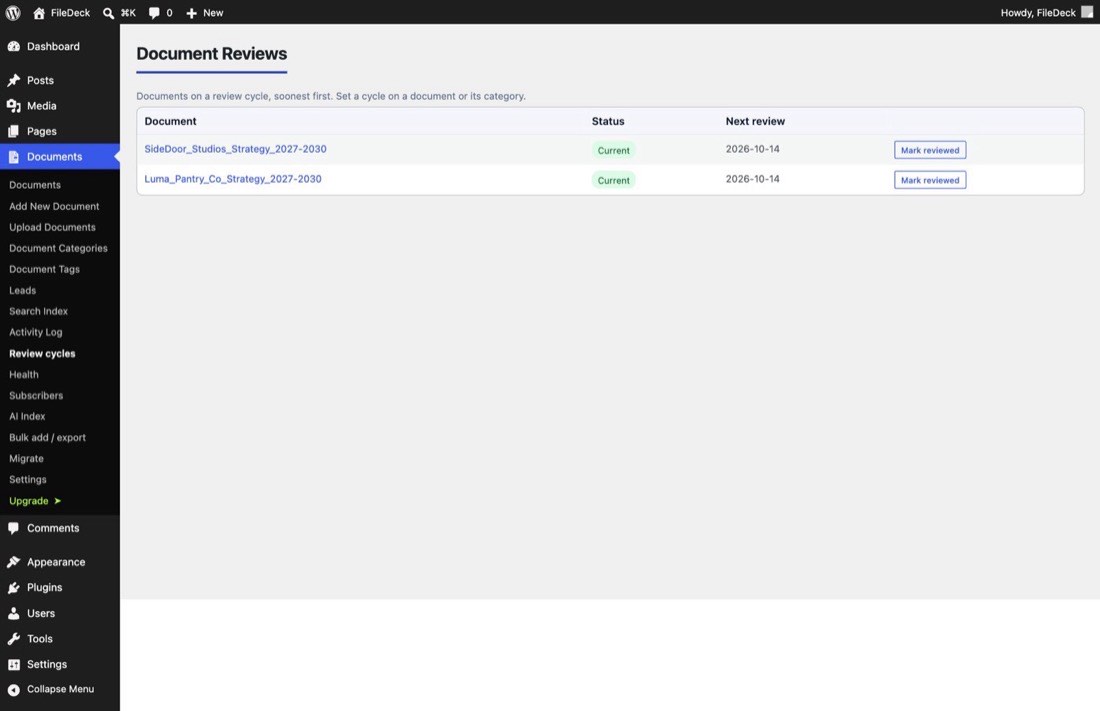
Go to Documents → Review cycles — inside the Compliance section, on sites that have one. The Document Reviews screen lists every document on a cycle, soonest first, with three columns:
- Document — the title, linked to the editor.
- Status — for example Current for documents that are up to date. The same badge appears in the Review column of the main Documents list.
- Next review — the date the next review is due.
When you have checked a document, click Mark reviewed. That resets the clock: the status returns to current and the next review date moves forward by one full cycle.
How do reminders work?
FileDeck emails you when reviews come due, using WordPress’s built-in wp_mail function. If your host cannot send mail reliably, install an SMTP plugin so reminders actually arrive.
FAQ
What happens if I ignore a due review?
The document stays published — nothing is hidden or unpublished. The status on the Document Reviews screen simply shows it is due, and reminders continue until you mark it reviewed.
Does a document-level cycle override the category default?
Yes. A cycle set on the document itself takes precedence; the category’s Default review cycle applies to documents that do not have their own.
Is this the same as document expiry?
No. Expiry removes a document from libraries on a date; a review cycle keeps it published and asks a human to re-check it on a schedule.
Still stuck? Email support@getfiledeck.com.