
AI semantic search: find documents by meaning
Turn on AI semantic search at Documents → Settings → AI search to find documents by meaning. Vectors are stored in your own database.
Updated July 16, 2026
AI semantic search finds documents by meaning, not just matching words — a search for "time off rules" can surface a document about vacation policy even if the exact words never appear. It is off by default: FileDeck uses keyword search only until you turn it on under Documents → Settings → AI search. You bring your own API key from an embedding provider such as OpenAI.
FileDeck AI — semantic search is part of the AI plan (from $119/year), which also includes the "Ask this library" chat and AI summary/tag suggestions. See pricing. AI features require your own AI provider API key.
How do I turn on AI search?
- Go to Documents → Settings → AI search.
- Change AI mode from Off (keyword search only) to using your own API key.
- Choose your embedding Provider (for example, OpenAI).
- Enter your API key. It is stored securely and not shown again.
- Optionally pick a model. The default is a compact, low-cost model (for example,
text-embedding-3-small), which is fine for most libraries. - Save your changes.
How do I build the AI index?
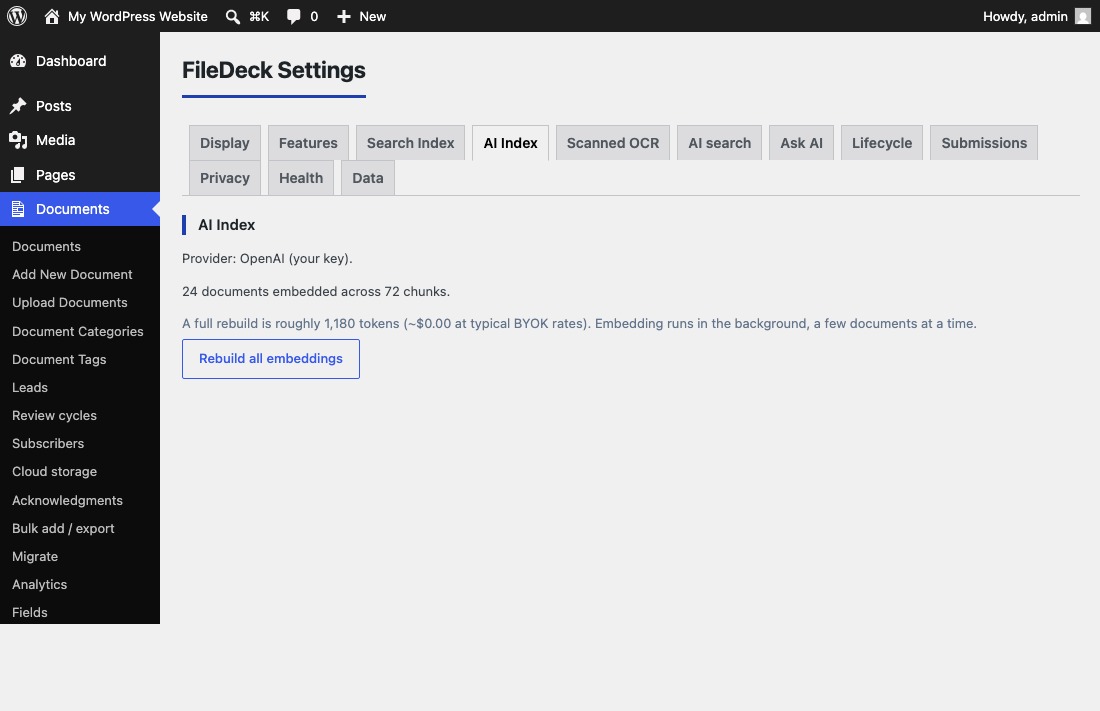
- Go to Documents → Settings → AI Index.
- Build the index. FileDeck turns your document text into embeddings and stores the vectors in your own database.
- Rebuild from the same screen after large changes to your library, such as a bulk import.
What data leaves my site?
AI indexing is opt-in. When it runs, chunks of your document text are sent to the embedding provider you chose. Nothing is retained off-site — the resulting vectors are stored in your own database.
Keyword search is unaffected either way: full-text search always stays 100% on your server and does not need the AI index.
Is there a managed option?
Not yet. A managed service routed through FileDeck is planned but not currently available, so for now you need your own API key with an embedding provider.
FAQ
Do I need AI search for regular search to work?
No. Keyword and full-text search work without it and run entirely on your server. AI search is an optional layer on top.
Where are the embeddings stored?
In your own WordPress database. The provider processes text chunks during indexing but retains nothing off-site.
Can I change the embedding model?
Yes — the model field on Documents → Settings → AI search is optional, and the default is a compact low-cost model.
Does this power the "Ask this library" chat?
AI semantic search is one of its requirements. See Ask this library for the full go-live checklist.
Still stuck? Email support@getfiledeck.com.