
Activity log: downloads, views, and searches Pro
FileDeck's activity log records downloads, views, and searches under Documents → Insights → Activity log, with totals, a content-gaps report, and CSV export.
Updated July 23, 2026
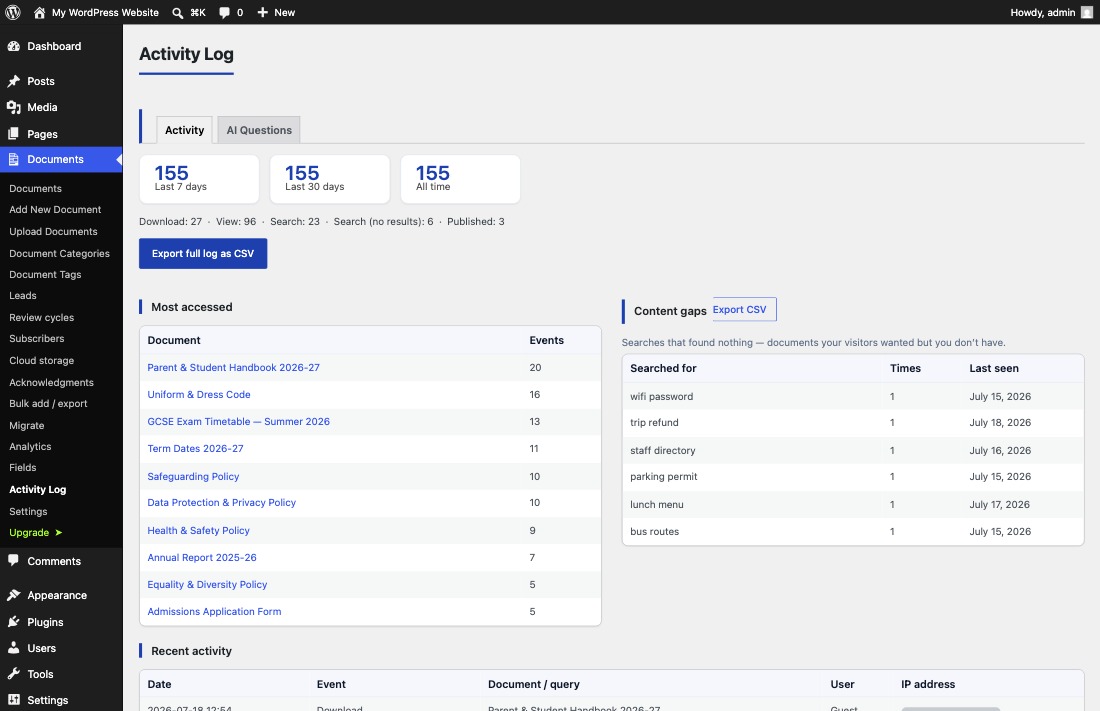
FileDeck Pro records what happens in your library — downloads, views, searches, and publishes, with who, when, and what — under Documents → Insights → Activity log. The screen shows totals for the last 7 days, 30 days, and all time, a "Most accessed" table, and a content-gaps report of searches that found nothing, all exportable to CSV.
FileDeck Pro — this feature is included in all Pro plans. See pricing
Turn on activity logging
- Go to Documents → Settings → Features.
- Enable Log activity — views, searches and downloads (who / when / what).
- Save. Events now appear under Documents → Insights → Activity log.
What gets logged
Each entry records who did what, and when. Where the person was signed in, the entry names them rather than recording an anonymous visit.
The log covers downloads and zip downloads, document views, searches and searches with no results, publishing, updating, deleting, superseding and restoring documents, approvals, check-outs, and failed integrity checks. It also records the moments you are most likely to be asked to evidence: a visitor accepting your terms before a download, completing a required form, and — on the AI tier — acknowledging a document, a transmittal being sent, a retention rule being applied, and an access review being completed. AI questions (answered and unanswered) are recorded on the AI tier too.
Search analytics cover every search surface: the library search box (including large server-mode libraries), the site-wide ⌘K command palette, full-text content search, and AI semantic search all feed the same popular-searches and content-gaps reports. Known crawlers are filtered out, and a run of keystrokes counts as one search, not ten.
Reading the totals
The cards at the top of the screen show totals for the last 7 days, the last 30 days, and all time, each broken down by event type. A quick glance tells you whether the library is getting busier and whether visitors are finding things (searches with results) or bouncing off (searches with none).
Most accessed
The Most accessed table lists documents by event count, so you can see which files earn their place in the library — and which have never been touched.
Content gaps: searches that found nothing
The Content gaps table lists searches that found nothing — not by title, reference number, category or tag in the library, and not inside the files — documents your visitors wanted but you don’t have. For each term you see how many times it was searched and when it was last seen, and the table has its own CSV export. Treat it as a ready-made content to-do list: every row is demand you can meet by adding or renaming a document.
Exporting the log
Click Export full log as CSV to take the whole log into a spreadsheet, or use the separate CSV export on the content-gaps table when you only need the missed searches.
Retention and privacy
Retention and anonymization live on the Privacy tab of Documents → Settings:
- Retention — keep log rows forever, or purge older rows daily (rows include visitor IPs).
- Anonymize IP addresses — mask the last part of each IP before it is stored.
- FileDeck registers with WordPress core privacy tools, so a visitor’s activity can be exported or erased from Tools → Export / Erase Personal Data.
Reflect activity logging in your privacy policy, as you would for any analytics.
FAQ
How do I turn the activity log on?
Enable Log activity — views, searches and downloads (who / when / what) under Documents → Settings → Features.
What is the content gaps report?
A table of searches that returned no results, with how often each term was searched and when it was last seen. It has its own CSV export and shows you exactly what visitors wanted but could not find.
How long are log entries kept?
Your choice, on the Privacy tab: keep them forever, or purge older rows daily. You can also anonymize IPs before they are stored.
How is this different from download counts?
Download counts give one lifetime number per document. The activity log adds views, searches, missed searches, who and when, period totals, and CSV export.
The views column
With activity logging on, every document keeps a running view count, and you can
show it in a library with the views column:
[filedeck columns="title,downloads,views"]
It is sortable like any other column.
Two things worth knowing. The count is a running total kept alongside the log rather than read out of it, so trimming old log rows with a retention window does not reset it. And with logging switched off the column shows a dash rather than a zero — "nobody looked at this" and "we are not recording" are different statements, and a confident zero would be the wrong one.
Views are recorded on the document’s own page, and known bots are excluded, the same as download counts.
Still stuck? Email support@getfiledeck.com.