
Multi-select zip downloads Pro
Let visitors tick checkboxes in a FileDeck library and download the selection as one zip. Requires PHP ZipArchive and respects all access restrictions.
Updated July 23, 2026
FileDeck Pro lets visitors select several documents with checkboxes and download the whole selection as a single zip file. It saves your visitors from clicking through ten separate downloads, and it respects every access restriction you have set.
FileDeck Pro — this feature is included in all Pro plans. See pricing
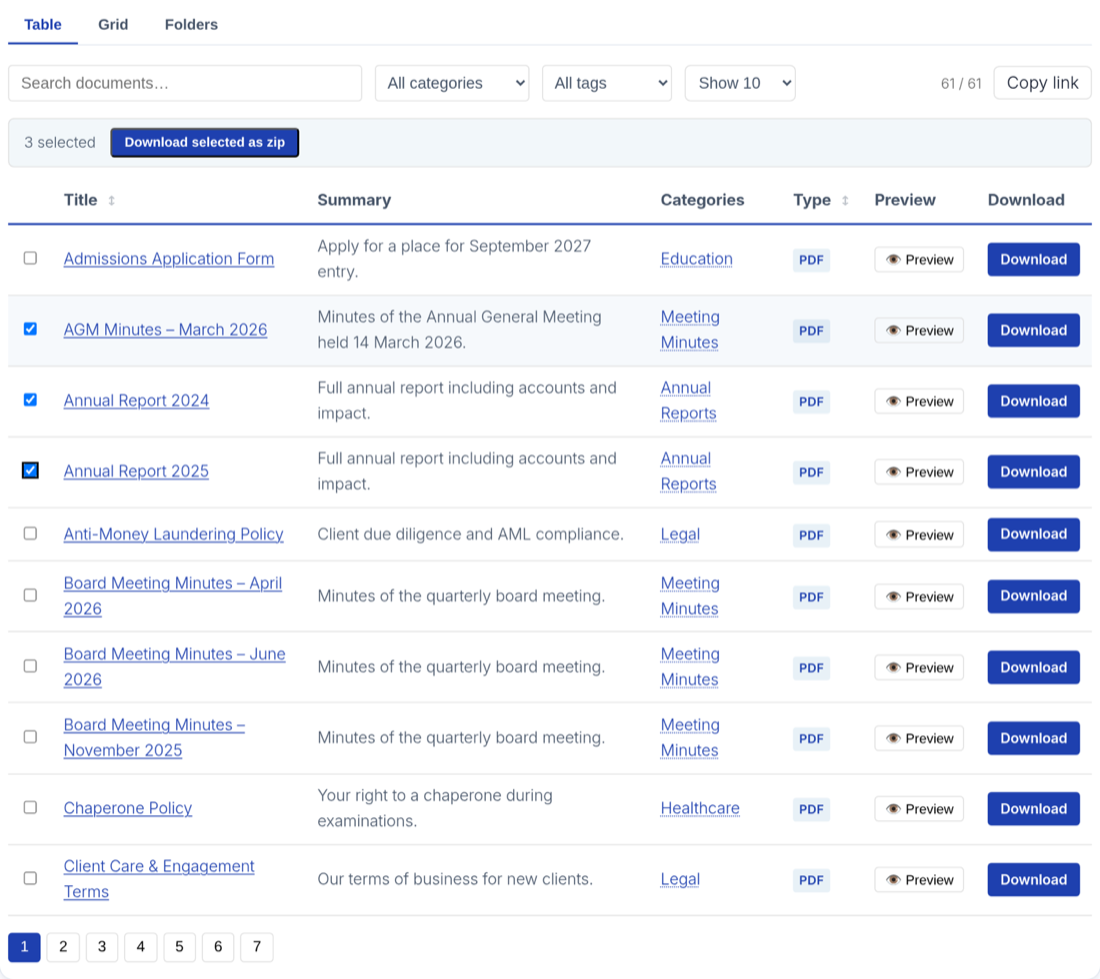
Enable zip downloads
- Go to Documents → Settings → Features.
- Turn on Multi-select + download as zip.
Checkboxes then appear next to each document in your libraries, along with a control to download the current selection.
How it works for visitors
- In the document library, the visitor ticks the checkbox next to each document they want.
- They start the download for the selection.
- FileDeck builds one zip containing the selected files and the browser downloads it.
This works in your library layouts wherever the documents are listed, so visitors can gather a set of policies, forms, or meeting papers in one action.
Requirements
Zip downloads use PHP’s ZipArchive extension, which is present on nearly all hosts. If zip downloads fail on your site, ask your host to enable the ZipArchive PHP extension — it is a standard component and hosts enable it routinely. General download problems are covered in troubleshooting downloads.
Access control is respected
Zip downloads never become a loophole around your restrictions:
- Documents the visitor is not permitted to access are excluded from the zip.
- Documents that link to an external URL are excluded too — there’s no file on your server to add to the archive.
- A single archive covers at most 100 documents and about 200 MB of content; anything past that is left out rather than failing the download.
- Documents the visitor can access — including protected files served via signed URLs — are included normally.
So a member and an anonymous visitor selecting the same rows can receive different zips, each containing only what that person is allowed to have. See the access control overview for how restrictions work.
Downloads are counted per document
Each document included in a zip has its own download counted, exactly as if it had been downloaded individually. Your download counts and Pro reports stay accurate even when visitors grab files in batches.
FAQ
Why do zip downloads fail on my site?
The most common cause is a missing PHP ZipArchive extension. Ask your host to enable it; it is available on nearly every hosting platform.
Can visitors zip-download restricted documents?
Only if they have permission. Restricted documents are excluded from the zip for anyone who is not allowed to access them.
Do zip downloads affect download statistics?
Yes, correctly — each document in the zip is counted as one download for that document, in both the free counter and the Pro download log.
Is there anything to install for zip support?
Usually not. ZipArchive ships with almost all PHP installations; FileDeck uses it automatically when present.
Still stuck? Email support@getfiledeck.com.