
Download counts Free & Pro
FileDeck counts every document download with a lifetime counter shown in the Documents admin list. Free in all plans; see the Pro log for who and when.
Updated July 23, 2026
FileDeck keeps a lifetime download counter for every document, included in the free plugin. The count is visible in the admin document list, so you can see at a glance which documents your visitors actually use.
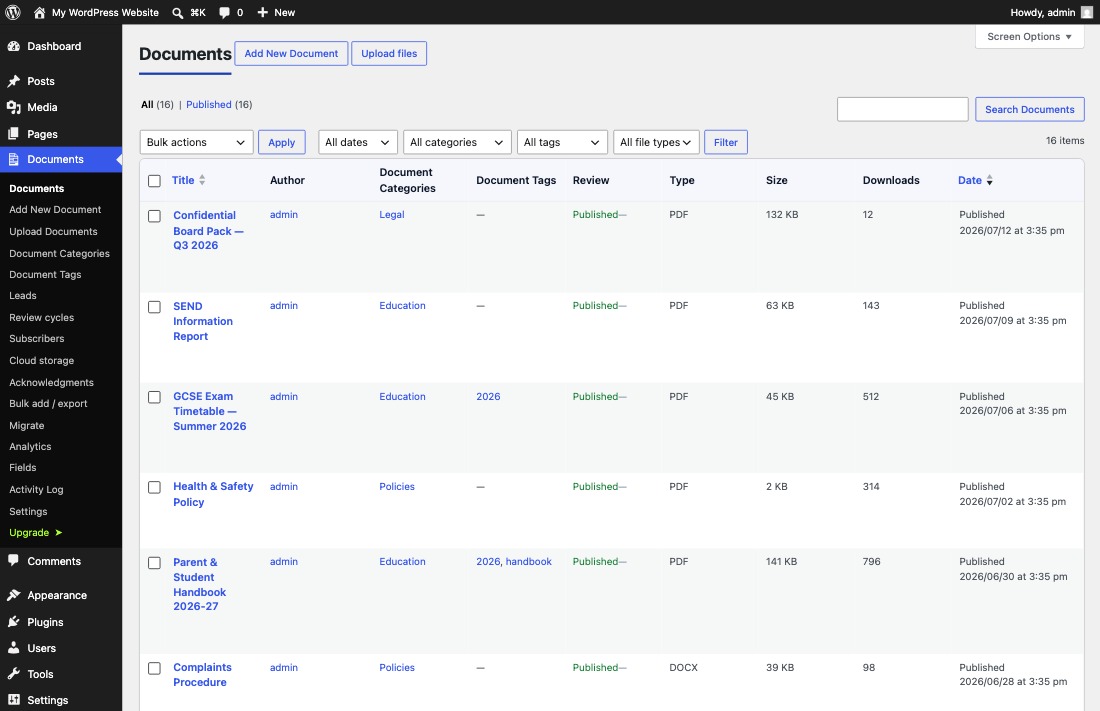
Where to see download counts
- Go to Documents → All Documents in wp-admin.
- Each document’s lifetime download count appears in the list.
Scan the list to spot your most-downloaded documents and the ones nobody touches. (For ranked figures, Pro’s analytics dashboard lists top documents directly.)
How downloads are counted
Every FileDeck download routes through the plugin’s download endpoint, /wp-json/filedeck/v1/download/{id}. Counting happens at that endpoint, which means the counter works no matter how the download was triggered: a button, an icon, or a text link, in any layout, on any page where the library appears. For unprotected documents the endpoint counts the download and then redirects to the file.
Because counting happens at the endpoint, your own test downloads increment the counter too.
What the count does and does not tell you
The counter is a single lifetime total per document. It tells you how popular a document is overall, but not:
- who downloaded it — no names or users are recorded;
- when downloads happened — no dates, trends, or per-period breakdowns.
If you need that detail, FileDeck Pro’s download log and reports record who (for logged-in users), what, and when for every download, with per-document and per-period reports and CSV export. See free vs Pro for the full feature comparison.
FAQ
Is download counting free?
Yes. The lifetime per-document counter is included in the free plugin from wordpress.org.
Does viewing the library page increase the count?
No. Only requests to the download endpoint are counted — a visitor has to actually download the document.
Do zip downloads count?
Yes. With Pro’s multi-select zip downloads, each document included in the zip has its own counter incremented.
Can I see who downloaded a document or when?
Not with the free counter. That is what the Pro download log is for — it records the logged-in user, the document, and the time of each download.
Still stuck? Email support@getfiledeck.com.