
Email subscriptions and digests Pro
Let visitors subscribe to a daily or weekly email digest of new and updated documents, with double opt-in and a Subscribers screen to manage them.
Updated July 14, 2026
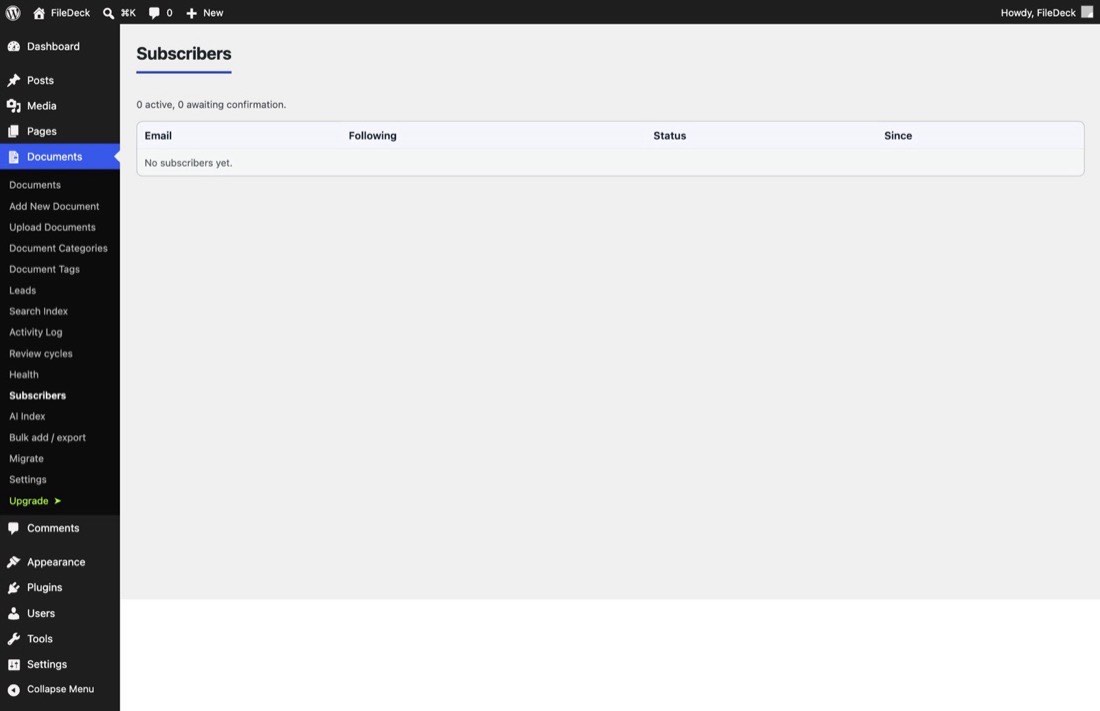
FileDeck can email visitors a digest of documents that were added or updated in your library. Visitors subscribe themselves through a form you place on any page, confirm by email (double opt-in), and then receive a daily or weekly summary. You manage the list under Documents → Audience → Subscribers.
FileDeck Pro — this feature is included in all Pro plans. See pricing
How do I set up subscriptions?
- Go to Documents → Settings → Lifecycle and enable Change subscriptions.
- Choose a digest frequency: Daily or Weekly.
- Add the subscribe form to a page — insert the FileDeck subscribe block in the block editor, or use the
[filedeck_subscribe]shortcode. - Save the page and visit it to confirm the form appears.
That is the whole setup. From here, visitors handle their own sign-ups.
What does a visitor’s sign-up look like?
Subscriptions use double opt-in. When someone enters their email address, FileDeck sends a confirmation message and lists them with the status "awaiting confirmation". Once they click the confirmation link, their status changes to "active" and they start receiving digests. Nobody gets email they did not confirm they wanted.
How do I manage subscribers?
Go to Documents → Audience → Subscribers. The table shows four columns:
- Email — the subscriber’s address.
- Following — what they are subscribed to.
- Status — active or awaiting confirmation; the screen also shows the totals ("N active, N awaiting confirmation").
- Since — when they signed up.
Why are digests not arriving?
Digest and confirmation emails are sent through WordPress’s wp_mail function. If subscribers are not receiving anything — confirmation emails included — the most common cause is a host that cannot send mail reliably. Install an SMTP plugin to route mail through a proper sending service, then test the sign-up flow again.
FAQ
What goes into a digest?
New documents and documents that have been updated since the previous digest. If nothing changed, there is nothing to report.
Can subscribers unsubscribe themselves?
Yes. Digest emails include an unsubscribe link, so the list maintains itself; you can also manage entries from Documents → Audience → Subscribers.
Is this the same as lead capture?
No. Lead capture asks for a name and email before a download. Subscriptions are opt-in mailing list sign-ups for ongoing digests — a visitor can be one without the other.
Still stuck? Email support@getfiledeck.com.