
Library health scans Pro
Health scans check published documents for missing files, dead links and downloads nobody wants, and flag restricted files an import left public. Weekly and on demand.
Updated October 13, 2026
A health scan checks every published document in your library for four kinds of rot: a file that has gone missing, an external link that no longer resolves, a file on your own site that is only linked by URL, and documents with no downloads after 90+ days. It also flags a document that uses the same file as a restricted document, and checks all your documents, drafts included, for three loose ends a restricted file or an import can leave behind. FileDeck runs the scan automatically once a week and emails you if it finds anything, so a quiet library stays quiet and problems surface on their own.
FileDeck Pro — this feature is included in all Pro plans. See pricing
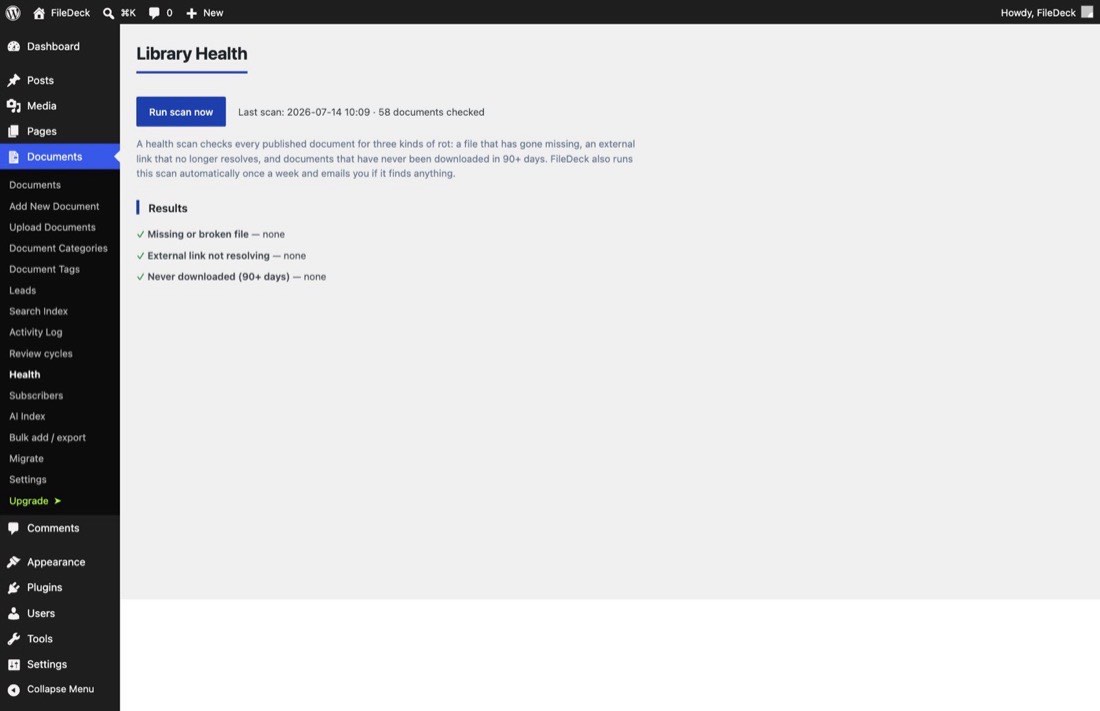
What does a health scan check?
Published documents are tested against four checks, and results are grouped by check:
- Missing or broken file — the document points at a file that is no longer there. This usually means someone deleted the file from the Media Library after attaching it.
- External link that no longer resolves — for documents whose file is an external URL (a shared drive or another site), FileDeck confirms the link still answers.
- File on this site linked by URL, not attached — the document’s "external" URL points at a file inside this site’s own uploads folder. It downloads fine, but a URL-linked document gets no zip checkbox, no preview, no thumbnails and cannot be vaulted. Older migrations and CSV imports can both leave these behind. The Health screen offers Attach them now, which attaches each document to its file where the file already sits, with nothing copied or moved; a restricted document gets its own protected copy instead. A file kept in another plugin’s private folder is left as a link, and those documents are counted on a line of their own rather than in the number to attach.
- Never downloaded in 90+ days — the document has been published for at least 90 days and nobody has ever downloaded it. Not an error, but a signal: the document may be mistitled, buried, or simply not needed.
One more check looks for a restricted document’s file that another document still hands out:
-
Shares its file with a restricted document, but not its restrictions — two documents can use the very same file: a duplicate keeps the original’s file, and a file picked from the Media Library or brought in by an import may already belong to another document. When one of them is restricted (or view-only), FileDeck keeps the file in protected storage for that one, but each of the others still serves it to its own audience. So this check lists:
- a published document that isn’t restricted: anyone who can open it can download the file;
- a published view-only document that isn’t restricted, beside a restricted one: anyone can view the file through it;
- a document whose author can get the file through it but isn’t allowed to edit that file or the restricted document, whatever the listed document’s own restrictions. This covers a shared earlier version too, on drafts as well, because anyone who can edit a document can download its earlier versions from its version history.
Each row names both documents, with a link to edit each, and the author where the author is the reason. FileDeck changes nothing here by itself.
Three more checks cover drafts as well as published documents:
- Restricted, but the imported original is still public — when a one-click import brought in a restricted document, FileDeck gave it its own protected copy and left the original where the old plugin keeps it, so the old plugin kept working. Anyone with a direct link to that original can still open it. Each row names the original file and offers Delete original, or Move into protected storage if you’d rather keep it.
- Restricted, but the file could not be moved into protected storage — the document is restricted, but moving its file into protected storage failed, so the file is still at its public uploads address. This usually means the uploads folder isn’t writable by the web server.
- Imported without its file — an import (one-click or CSV) created the document but could not bring its file across: the file was missing or refused, FileDeck keeps it protected for another document and so did not share it with a new one, it could not be copied out of a folder the old plugin keeps closed to the web, it could not be moved into protected storage, or a WP Customer Area import was interrupted while copying it.
How do I run a scan?
You usually do not need to — FileDeck scans automatically once a week and emails you only when something turns up. To check immediately, for example after a bulk import or a Media Library cleanup:
- Go to Documents → Settings → Health.
- On the Library Health screen, click Run scan now.
- Review the results, grouped by the checks above. Restricted documents whose original is still public are listed at the top of the screen, with their actions. So are any items your last one-click import could not bring across, with a link back to the Migrate screen to import again (what to check).
After an update that adds a check, the Health screen shows that check as not checked yet until the next scan runs.
What should I do with the results?
Missing files are the urgent ones — reattach or replace the file from the document editor before a visitor hits a dead download. Broken external links need the URL fixed at the source or the document repointed. URL-linked local files are a one-click fix: Attach them now processes 100 per click (or run wp filedeck attach-local-files to do the whole library at once). Documents whose file is in another plugin’s private folder stay links, and Health says how many: move those documents to the Trash and import those rows again, and a row whose file is in your Media Library is then attached to it. A one-click import skips the documents it has already made, even ones in the Trash, so delete any it made permanently before you run it again; Health says how many there are. A document the button tried and could not attach (its file is of a type your site doesn’t allow, for example) is counted on its own line too and isn’t tried again until its link or its author changes: attach its file from the document editor. Zero-download documents are a judgment call: improve the title and categories or tags so people can find them, or retire them with document expiry.
Public originals are yours to settle once you’ve switched from the old plugin. Delete original is offered only when no other document uses the file and no post, page or menu links to it: in its content, a custom menu link, Elementor’s page data or as its featured image. It isn’t offered for your site icon or logo either. Anything that does is named in the row. Links kept anywhere else, such as another page builder’s data or a widget, aren’t checked, so look before you delete. Move into protected storage keeps the file but takes it off its public address; it isn’t offered while another document or Media Library item uses the file. Either way, the old plugin’s link to that file stops working. For a file that could not be moved into protected storage, make the uploads folder writable by the web server, then save the document, or, for an imported one, run its import again: that gives it its own protected copy and leaves the old plugin’s file where it is, whereas saving an imported document moves the file itself, so the old plugin’s link to it stops working. Run the scan again to confirm. An import that came in without its file needs the file attached from the document editor; running a WP Customer Area import again finishes a document an interrupted run left without its file.
A document that shares a restricted document’s file needs one decision: should that file be private? If it should, restrict the listed document the same way as the one it shares with, or, if nobody meant to make it, delete it permanently. A document in the Trash still has its version history, so empty it from there too. Replacing the listed document’s file in the editor isn’t enough on its own, because the shared file then becomes one of its earlier versions. A document listed because of its author stays listed, restricted or not, until it’s deleted permanently or its author is someone allowed to edit the restricted document. If the file doesn’t need protecting after all, remove the other document’s restriction instead. Run the scan again to confirm.
FAQ
Where do the alert emails go?
FileDeck emails you when a weekly scan finds problems, using WordPress’s wp_mail function. If alerts are not arriving, your host may not send mail reliably — install an SMTP plugin.
Does a scan slow down my site?
No. Scans run in the background in the admin; visitors browsing your library are unaffected.
Does the scan check draft or expired documents?
The four library checks cover published documents, the ones visitors can reach. So does the check for documents that share a restricted document’s file, except for earlier versions: when the author is the reason, those are listed on drafts too, because anyone who can edit a draft can download its earlier versions. The three checks for restricted files and imports cover drafts too, because an import often brings documents in as drafts.
Will FileDeck delete an old plugin’s files by itself?
No. An original listed here is deleted, or moved into protected storage, only when you click its button on the Health screen, one file at a time. The one case where an import moves an original itself is when it can’t give a restricted document its own protected copy, and the import summary says so.
Still stuck? Email support@getfiledeck.com.